
Global high-mix volume high-speed PCBA manufacturer
9:00 -18:00, Mon. - Fri. (GMT+8)
9:00 -12:00, Sat. (GMT+8)
(Except Chinese public holidays)





HomePage > Blog > Knowledge Base > AI Robot PCB Assembly: What Changes from Design to Production?
1. What Makes AI Robot PCBs Different from Conventional Robotics Boards?
2. Which Assembly Challenges Become More Critical in AI Robots?
3. How Should AI Robot PCBA Be Tested Before System Integration?
4. How Do You Move an AI Robot PCB from Prototype to Production?
Here the problems faced by robotic PCB assembly also vary. These components have to be mounted, but they also have to be kept stable at high speed, in frequent motion, and with continuous heat generation. The real problem of AI robot PCB assembly is not a single component, but whether these functions will work at the same time and interfere with each other.
As a result, the challenge of AI robot PCB assembly has progressively shifted from "can it be assembled" to "can the whole board work stably after assembly." In this blog, we will begin with these adjustments to see what distinguishes AI robot PCB from standard robot PCB, as well as what to look for during assembly, testing, and mass production.
In general, a conventional robot PCB has different functions. One board controls the motors, another reads sensor data, and a third handles power or communications. While the complete robot system isn't simple, the tasks each board is meant to perform are often quite clear.
Add AI, this situation has changed.
Think about what the robot needs to handle simultaneously while it is running? The camera continues to feed back images, LiDAR scans the surrounding environment, and the IMU and encoders provide motion data on a constant basis. These pieces of information must be swiftly supplied to the AI processor for processing, and the results must be transmitted to the robot control board so that the robot knows what to do next.
At the same time, the motors are not stopping. Starting, accelerating, braking, turning - all these actions cause the power demand to constantly change. That is to say, within a robot with a limited space, computing, sensing, control, and power supply are almost all happening simultaneously.
|
Area |
Conventional Robot PCB |
AI Robot PCB |
|
Computing |
Based on MCU control |
AI processor + high-speed memory |
|
Sensor Data |
Basic sensor inputs |
Cameras, LiDAR, IMUs, encoders |
|
Data Processing |
Mainly processes control instructions |
Real-time perception and AI inference |
|
Power Demand |
Relatively predictable |
AI computing + changing motor loads |
|
Board Interaction |
Various functions may be relatively independent |
Computing, sensing, power supply, and motion control are closely coordinated |
This is an important difference between AI robot PCB assembly and conventional robot PCB assembly: The difficulty does not lie in simply adding more components, but in enabling different types of circuits to coexist stably within a limited space. High-speed processors, sensitive sensor circuits, and robot power PCB have different requirements for signals, power, and heat dissipation.
For robotics PCBs this means that we can no longer view a single function in isolation. If one part fails, then it could affect the whole robot's sensing or movement.
As a result, AI robotics PCB manufacturing calls for closer attention to how these functions interact. And the most common challenges that arise during subsequent PCB assembly and testing are precisely these impacts.
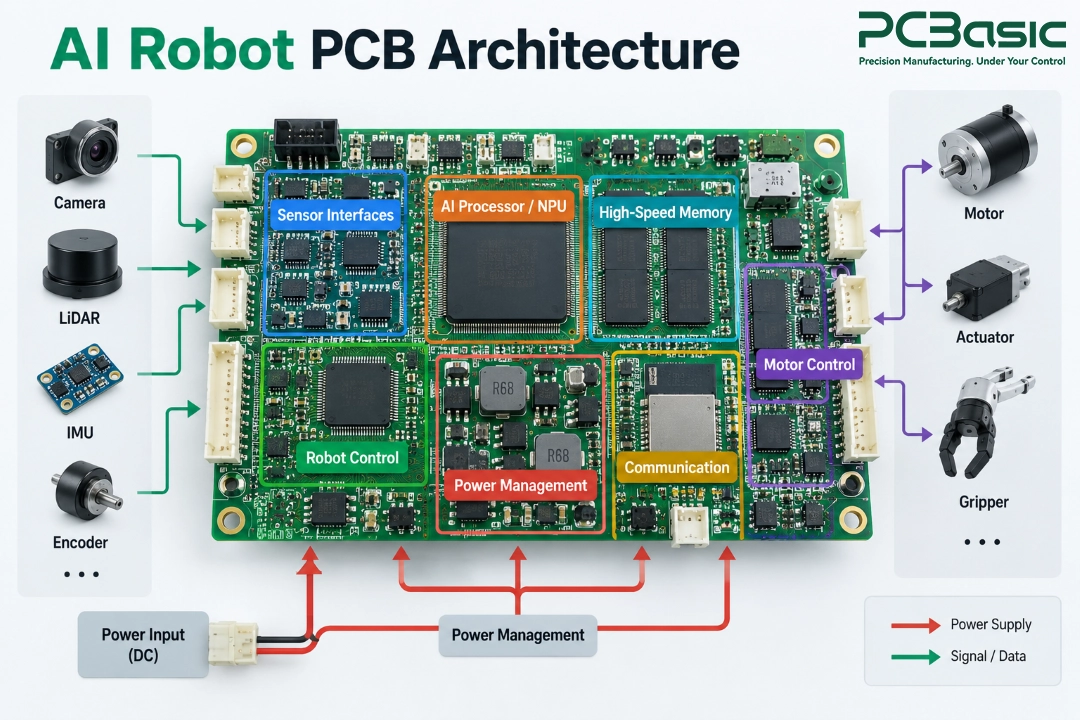
When AI robot PCB enters the production stage, the complexity of the design will soon be reflected in the manufacturing process. More densely packed components, higher power consumption, high-speed signals, along with constantly changing motor loads, will all bring new challenges to assembly.
AI processors and high-speed memory often use BGA or other fine-pitch packaging. The denser the devices, the smaller the pads and spacing. The requirements for solder paste volume, placement accuracy, and reflow soldering control in robot PCB assembly are also higher.
Some small process variation may not cause problems on a simple control board, but on high-density AI boards, they may result in solder bridges, open circuits, or poor solder joints. BGA also has a drawback: the solder joints are hidden at the bottom of the package. Areas that AOI cannot see often require further X-Ray inspection.
The AI processor needs continuous and stable power supply, while the loads of motors and actuators change rapidly with startup, acceleration or stall. Two completely different power demands can occur in the same robot.
Therefore, the robot power PCB is not just responsible for delivering power to various modules. If the current path, grounding, decoupling and thermal design are not handled properly, changes on the motor side may affect the processor or sensors, and the continuous working AI chip may also cause local high temperatures.
This is a common problem where you have high speed signals and motor circuits in the same environment. There are cameras and sensors feeding data. Beside them are the motor drivers, DC-DC converters and other circuits constantly switching on and off.
For robotics PCB assembly, sometimes such problems do not manifest as a complete circuit failure. The PCB can boot up normally, but sometimes there are communication errors, data loss or abnormal sensor readings. So, we cannot ignore the impedance control, grounding, high-speed interface and manufacturing consistency of the connectors.

The PCB in the robot is not immobile like the PCB on the test bench. Long-term vibrations, shock, temperature fluctuations, connector forces, and larger components can all put more strain on the solder joints and the robot PCB.
Therefore, after the robotic PCB assembly is completed, "being able to power on" is only the first step. The more practical question is: Can these solder joints, connectors, and mounted component remain stable after the robot repeatedly moves?
Can a PCBA that has passed the visual and soldering inspections be directly installed in a robot? Not always. Certain problems only show up when the circuit board begins processing data and managing motors; they cannot be found on the assembly line.
So, in AI robot PCB assembly, we usually start by checking the most basic issues first. SPI checks the solder paste, AOI checks the components and the visible solder joints, and BGA and other hidden solder joints are inspected using X-Ray. Next, we look at the main power rails, check for any short circuits, open circuits, and key connections to make sure the basic electricity is working properly.
But this is just the beginning. Before we integrate the system, we also need to check how it actually works:
• Sensor input: Can the data from cameras, IMUs, encoders, etc. be continuously and reliably transmitted?
• Communication: Can the AI computing board and the robot control board exchange data normally?
• Control output: Can the processed instructions be correctly sent to motor drivers and other control circuits?
• Operation under load: Can the power supply and signals remain stable when computing, communication, and sensors are all working simultaneously?
Why do we need to get to this point? Some PCBs might look fine at first and also work properly when you turn them on. However, when several interfaces are working at the same time, problems like communication errors, unreliable sensor readings, and unexpected system resets can happen. These issues are hard to find just by using AOI, X-Ray, or simple electrical tests.
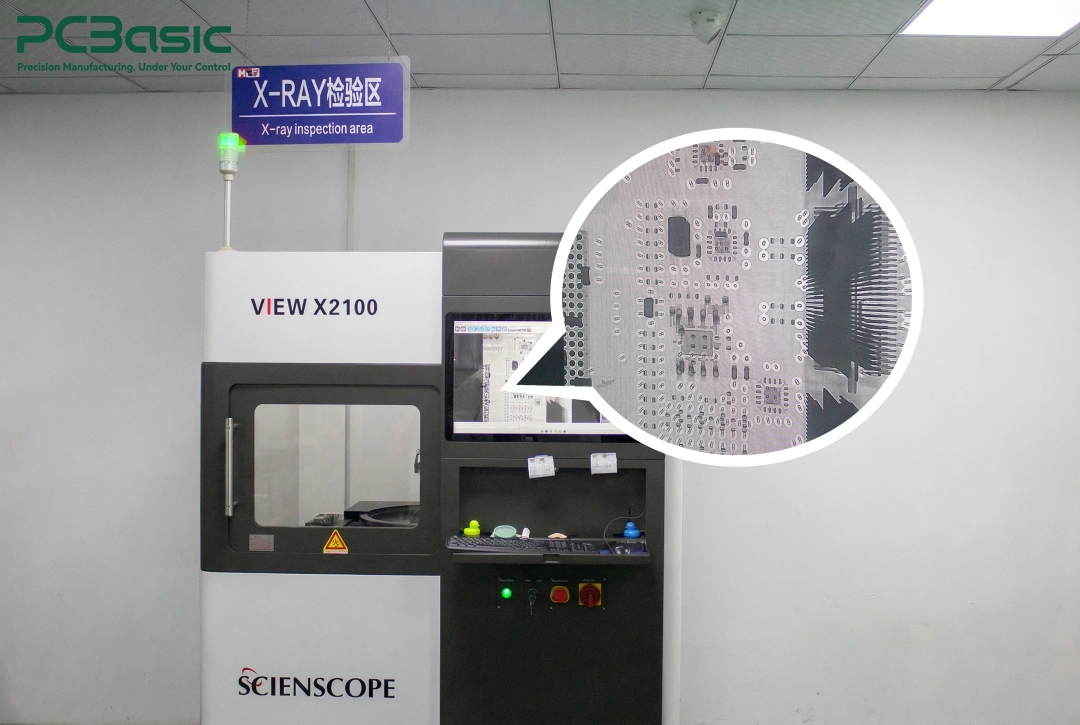
For actual robot projects, the testing process should be created according to the specific product rather than sticking to a standard method. PCBasic can design functional testing fixtures based on the testing requirements, programs, and interfaces provided by the customer to verify the actual functions such as sensor input, communication interfaces, and control outputs.
There is another issue that is often overlooked: how to test. It is best to decide this before the production process begins. In robotics PCB assembly, if test points, programming or JTAG interfaces have been reserved during the design phase, and the connection of the functional test fixtures has been considered, the later testing and troubleshooting will be much simpler.
During mass production, the test results should not simply disappear after a Pass or Fail decision The results should be correlated with the specific PCB or production batch. If similar sensor, communication or power supply issues arise later, we can refer to the records and compare the data to quickly identify where the problem begins.
If a prototype functions properly, it indicates that the design is basically feasible. However, this does not mean that every single board during mass production will maintain the same performance.
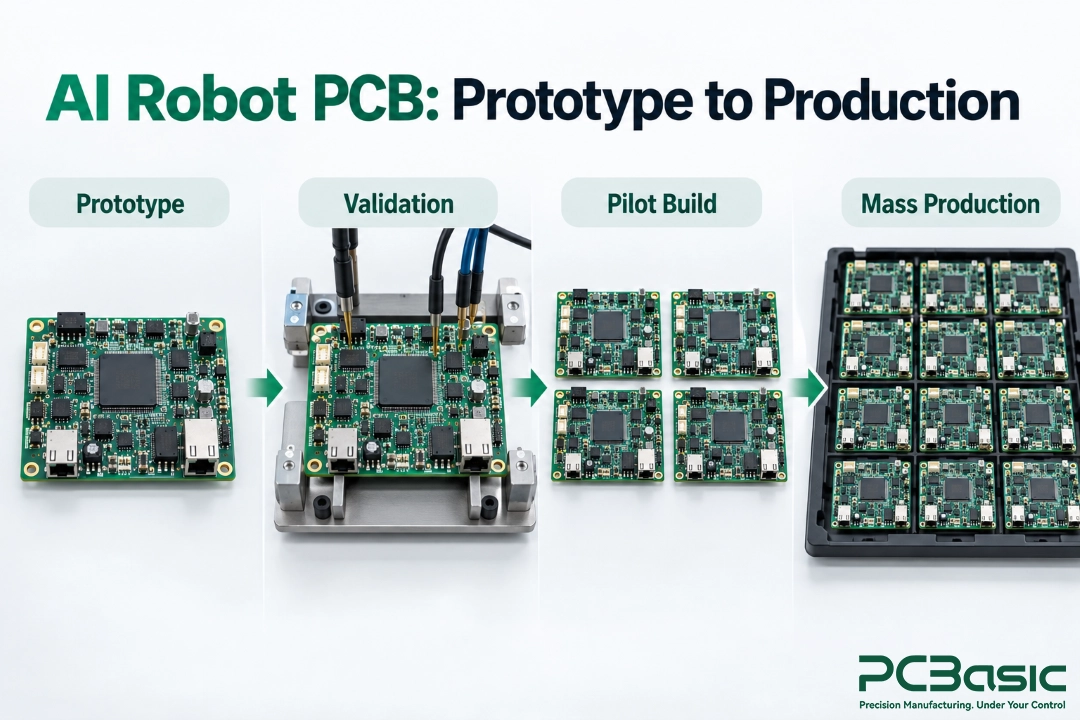
In the early stage of AI robot PCB assembly, we first confirm the operation of the processor, thermal performance, sensor and motor control interfaces, as well as the normality of the actual assembly through a prototype. Once the prototype is stable, the project usually needs to go through pilot build rather than directly entering mass production.

At this point, our focus also changes: it is no longer just "Can this board work?", but "Can the next batch still be made the same way?"
During the pilot build, several things need to be determined:
• BOM: Confirm the quantity of raw materials and the approved alternatives.
• Production process: Lock down the already verified assembly and testing methods.
• Revision control: Ensure consistency among Gerber files, BOM, firmware, and test files.
• Pilot feedback: Based on the actual production and testing results, complete necessary adjustments before mass production.
The entire process can be summarized as:
Prototype → Validation → Pilot Build → Mass Production
PCBasic can provide continuous support for the project from DFM, component sourcing to SMT assembly and THT assembly, enabling the AI robotics PCB manufacturing to smoothly transition from prototypes to stable production.
For robot PCB assembly, the goal of mass production is not to just produce one good board, but to ensure that the next batch and the batch after that can be produced stably.
The challenges in AI robot PCB assembly go beyond just putting more complicated components onto the PCB. The real challenge is whether the whole board can keep working smoothly when AI processing, sensors, motors, and communication systems are all active at the same time.
This is also an important aspect that both robot PCB assembly and robotics PCB assembly should pay attention to. From creating initial designs to full-scale manufacturing, the main question we're trying to answer is: Can this PCB carry out its functions reliably and without issues in a real robot for a long period of time?
Developing AI robots for PCB? Send Gerber files, BOM and assembly requirements to PCBasic, and we can discuss the next steps based on your project needs.
Q1: What is different about AI robot PCB assembly?
AI robot PCB assembly combines AI computing, sensors, communication, and motion control, creating higher demands for power, thermal management, signal integrity, and assembly.
Q2: What does a robot control board do?
A robot control board connects sensors, processors, motor drivers, and other subsystems to manage robot control and communication.
Q3: Why is the robot power PCB important?
A robot power PCB supplies and manages power for processors, sensors, motors, and other circuits, especially when motor loads change quickly.
Q4: Can robotics PCB assembly support both prototypes and production?
Yes. Robotics PCB assembly can support prototypes, pilot builds, and volume production with consistent BOM, manufacturing, and testing processes.
Assembly Enquiry
Instant Quote
Phone contact

+86-755-27218592
In addition, we've prepared a Help Center. We recommend checking it before reaching out, as your question and its answer may already be clearly explained there.
Wechat Support

In addition, we've prepared a Help Center. We recommend checking it before reaching out, as your question and its answer may already be clearly explained there.
WhatsApp Support

In addition, we've prepared a Help Center. We recommend checking it before reaching out, as your question and its answer may already be clearly explained there.
