
Global high-mix volume high-speed PCBA manufacturer
9:00 -18:00, Mon. - Fri. (GMT+8)
9:00 -12:00, Sat. (GMT+8)
(Except Chinese public holidays)





HomePage > Blog > Knowledge Base > What Is a Motherboard? Definition, Types, and Components
A motherboard is the most crucial component in an electronic device and can be regarded as the "connection hub" for all hardware. Whether it's a desktop computer, laptop, or some embedded devices, the motherboard is indispensable. Components like the CPU, memory (RAM), graphics card, storage devices, and various peripherals are all connected together through the motherboard and communicate with each other to work together.
In simple terms, the motherboard is not only used for "connecting" components, but also responsible for supplying power, handling data transfer, and controlling the overall operation of the system. Key components like the chipset, BIOS/UEFI, VRMs (voltage regulator modules), and various interfaces are all located on the motherboard, working together to ensure the stable operation of the computer.
In addition, a good motherboard should also offer strong expandability. For example, users are able to add more memory, install a larger r storage device, and upgrade the graphics card. So, understanding the motherboard can not only help you understand how a computer works, but also assist you in choosing a more suitable motherboard when making a purchase.
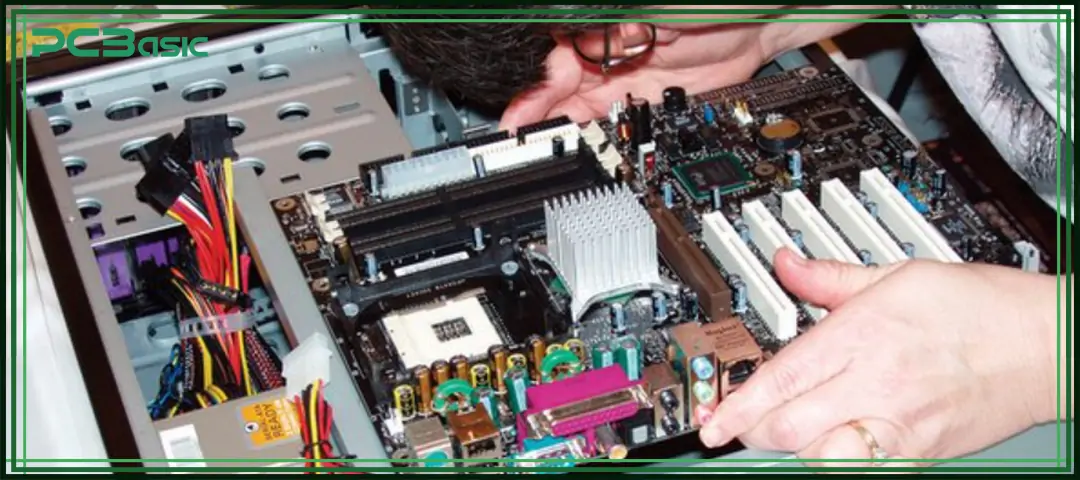
The motherboard is usually located at the core inside the device and serves as the base platform for installing and connecting all hardware. Its exact location varies depending on the type of device:
The motherboard is installed inside the chassis, usually fixed to one side panel with screws. It is connected to the power supply, storage devices, cooling system, and front panel interface. After opening the computer case, the largest circuit board you see is usually the motherboard.
In laptops, the motherboard is also located inside the device, but its structure is more compact. It is usually under the keyboard or the bottom cover. Components such as the CPU, memory and storage will be directly integrated or closely arranged on the motherboard to save space.
In smartphones, tablets, TVs and industrial equipment, motherboards are generally installed in the core area inside the enclosure, usually close to the processor and main chips. Due to the compact structure of the device, the position of the motherboard will be specially arranged according to the internal space, but the entire device is fixed inside the device and serves as the basic connection position for all components.
Overall, the motherboard is the base of the entire device. Almost all key hardware components are either directly installed on the motherboard or connected to it through cables or connectors. Therefore, its position is crucial to the structure and performance of the device.
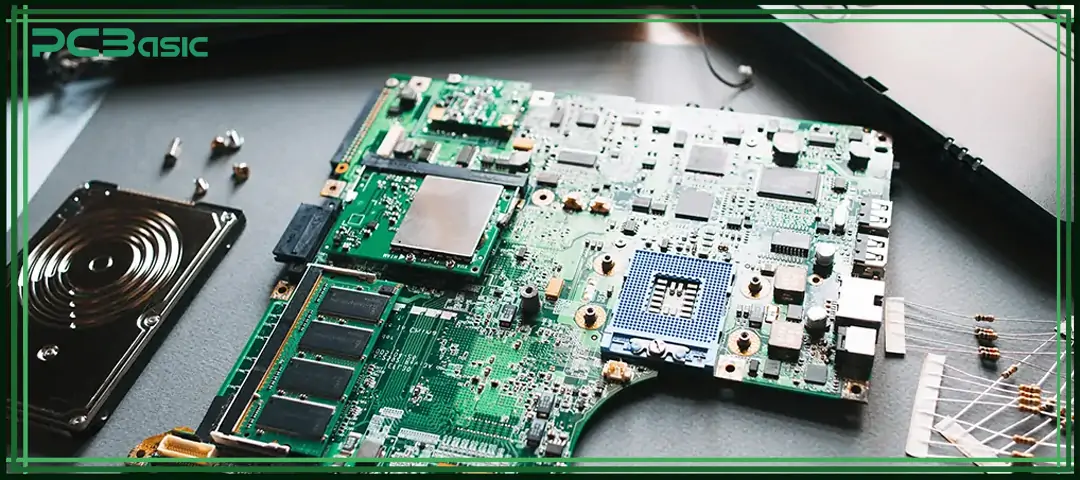
A motherboard is the core platform that connects all the hardware together. It is responsible for power supply, data transfer, and coordinating the work of various components together. The motherboard is not responsible for calculating itself (that is mainly done by the CPU), but without a motherboard, all hardware cannot operate normally.
The motherboard receives power from the power supply unit (PSU) and then distributes it to devices such as the CPU, memory, graphics card, storage devices, and other components. The VRM (Voltage Regulator Module) on the motherboard will stabilize the voltage to ensure a normal power supply for all hardware components.
The motherboard provides data pathways such as PCIe and memory channels, enabling rapid data exchange among the CPU, RAM, and GPU. Tasks like programs and displaying graphics are all transmitted through the motherboard.
When the system starts, the BIOS/UEFI and chipset on the motherboard will first work to check if the hardware is functioning properly, complete initialization, and then enter the operating system.
Signals such as keyboard input, data read/write from storage, and display output will all be transmitted and controlled through the motherboard. In simple terms, all signals have to pass through the motherboard.
The motherboard is equipped with ports such as USB, HDMI, and Ethernet, as well as expansion slots such as PCIe and M.2, allowing users to connect external devices or upgrade hardware, such as adding more memory or upgrading graphics cards.
In simple terms, a motherboard is like a hub, responsible for power supply, data transfer, and device connection, ensuring that all hardware works properly together.
A motherboard’s structure is rather complex, but it can be simply understood as "a board + circuits + components".
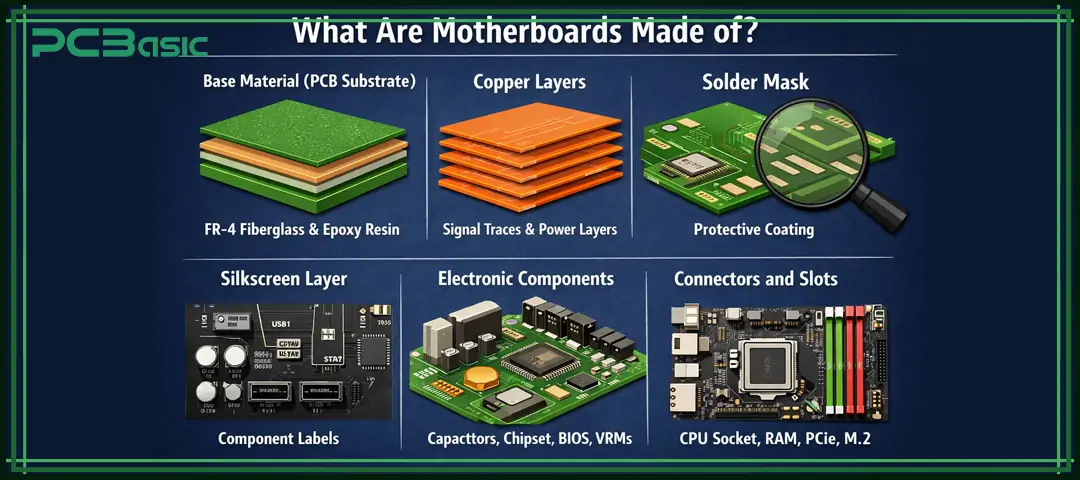
The bottom layer of the motherboard is a PCB board, usually made of fiberglass (FR-4) and epoxy resin, which provides support and insulation, making the entire motherboard stronger and more durable.
Inside the motherboard, there are multiple layers of very thin copper, which are the circuit paths used to carry power and signals. The higher-end the motherboard, the more copper layers it usually has.
The common green layer on the surface of the motherboard is the solder mask. Its function is to protect the circuit and prevent short circuits during soldering.
The white markings on the motherboard are the silkscreen, which are used to mark the positions of interfaces and components, facilitating installation and maintenance.
There are many components soldered on the motherboard, such as capacitors, resistors, chipsets, BIOS/UEFI chips and VRM. These are all key parts for the motherboard to work properly.
There are various connectors and slots on the motherboard, such as CPU sockets, RAM slots, PCIe, SATA and M.2 interfaces, which are used to connect and install different hardware components.
In simple terms, a motherboard is a combination of base boards, circuits, and various components. Only when these parts work together can the entire computer run smoothly.
Next, let's take a detailed look at motherboard components. Each part of a motherboard plays a key role in the operation of the system:
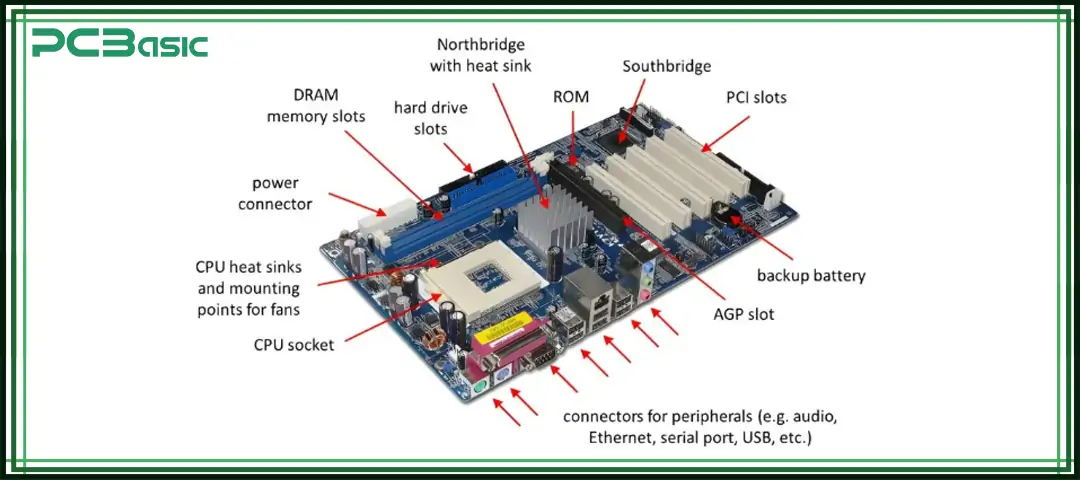
The central processor is mounted here. Intel and AMD use different socket types.
These slots house memory modules and determine the type and capacity of RAM supported.
It acts as a traffic controller between the CPU, memory, and peripherals. It defines features like overclocking and PCIe support.
These include the 24-pin ATX connector and 8-pin CPU power connector for supplying power to the board.
They are used for graphics cards, sound cards, Wi-Fi adapters, and more.
They connect SSDs and HDDs to the system.
They are located on the rear panel for USB, HDMI, Ethernet, and audio connections.
This controls basic input/output and hardware initialization before the OS boots.
These ensure stable power delivery to the CPU and other critical components.
These motherboard components work together to determine the performance and compatibility of the motherboard.
There are different types of motherboards on the market, suitable for different device sizes, usage requirements and hardware expansion scenarios. When choosing a motherboard, the most suitable type of motherboard should be determined based on the size of the case, the number of hardware components, and the purpose of use. Here are several common types:
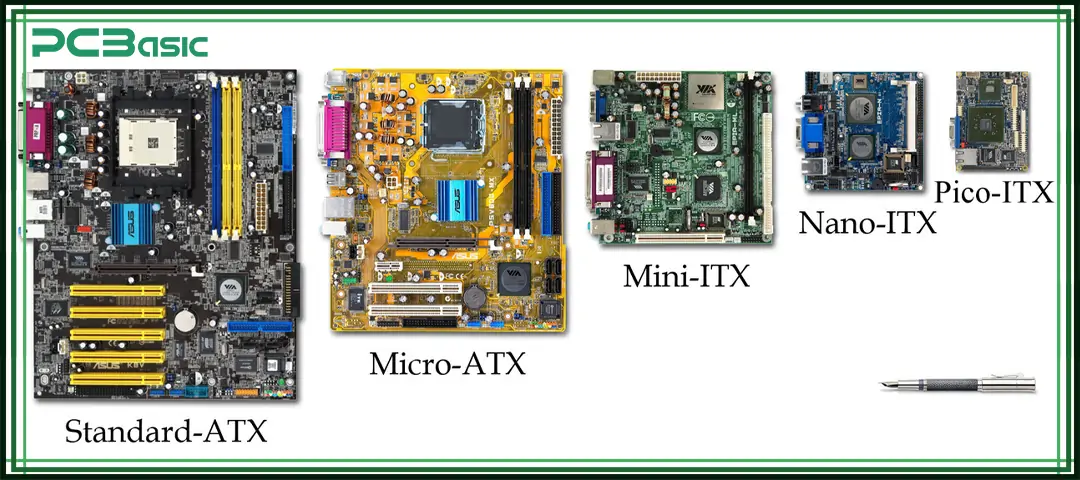
The ATX motherboard is currently the most commonly used standard-sized computer motherboard, with a size of 305mm × 244mm. It offers ample space and is typically equipped with multiple PCIe slots, up to 4 memory slots, and rich storage interfaces, such as SATA and M.2. This type of motherboard is highly suitable for users with high requirements for performance and expandability, such as gaming computers, high-performance workstations, or professional equipment that needs multiple graphics cards. If you need a fully functional and easy-to-upgrade main board, ATX is the ideal choice.
The Micro-ATX motherboard is a smaller version of the ATX, with dimensions of 244mm × 244mm. Compared to ATX, it has fewer expansion slots, usually supporting 2 to 4 RAM modules, and the number of PCIe lanes is also smaller. However, its functions are sufficient for daily office work, multimedia entertainment or entry-level gaming computers. The Micro-ATX motherboard has high compatibility and good cost performance. It is a common choice for users who pursue a compact structure and cost control, and it is a very practical form factor among different types of motherboards.
The Mini-ITX motherboard is the smallest type among common computer motherboards, with a size of only 170mm × 170mm. It is applicable to mini-PCs, compact home systems or HTPCs (Home Theater computers). This type of motherboard usually only provides one PCIe slot and two memory slots, with limited expandability, but it is sufficient to meet basic computing needs. Due to its small size, the Mini-ITX is the first choice for creating space-saving devices and is suitable for users who have strict requirements for size among different types of motherboards.
The E-ATX motherboard is a larger motherboard type than the ATX, with a size of approximately 330mm × 305mm, and is suitable for a large chassis. It has a stronger expansion capability and can accommodate more PCIe slots and memory slots. It is commonly found in high-end gaming computers, graphics workstations or professional servers. For users with demands such as multi-GPUs, high-frequency memory, and large storage capacity, E-ATX offers the greatest flexibility and performance space and is a main board option for the high-end market.
Server-specific motherboards typically support ECC memory, multiple CPU slots, and redundant power supply designs. This type of motherboard is specifically designed for stability and long-term operation and is suitable for data centers, cloud computing platforms or enterprise server applications. Among all the different types of motherboards, the server motherboard has the strongest functions and the highest scalability, but its price and size are relatively higher and larger, making it more suitable for professional scenarios rather than ordinary users.
• CPU compatibility: Make sure the motherboard supports your CPU and uses the correct socket.
• Form factor: Choose a motherboard size (ATX, Micro-ATX, Mini-ITX) that fits your case.
• RAM support: Check the motherboard for RAM slots, capacity, and supported speed.
• Expansion options: Pick a motherboard with enough PCIe, M.2, and SATA ports for upgrades.
• Connectivity: Ensure the motherboard has the ports you need, like USB, HDMI, and Ethernet.
• Power and cooling: A good motherboard should have a stable power design and proper cooling.
• Build quality: Choose a reliable motherboard brand for better stability and durability.
• Budget: Select a motherboard that fits your budget without paying for unused features.
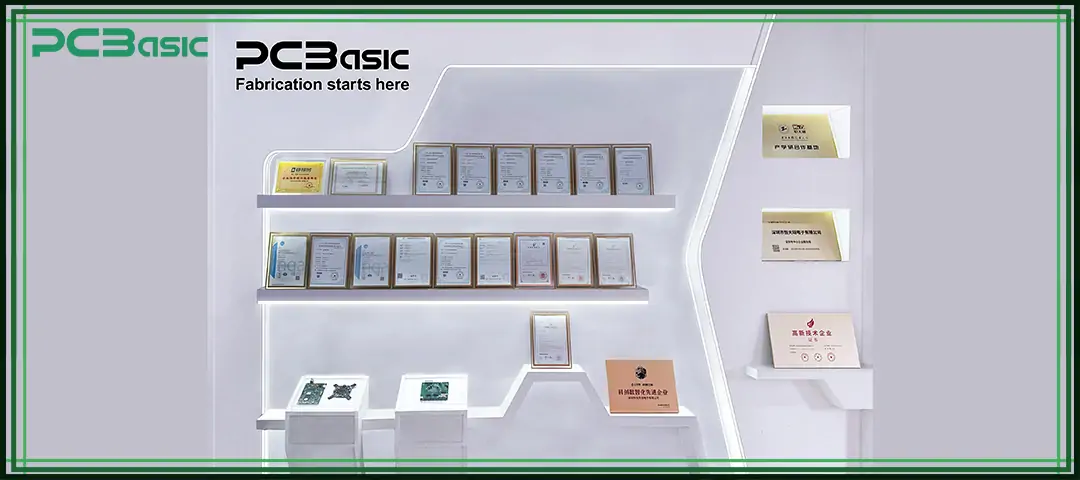
In the field of motherboard assembly, it is crucial to choose a partner who is experienced, responsive and of stable quality. With over a decade of industry accumulation in circuit board design and manufacturing, PCBasic, equipped with an intelligent factory and a complete quality management system, provides customers with a one-stop motherboard assembly solution from prototyping to mass production. Whether it's small-batch rapid delivery or large-batch efficient production, we can empower your products, enabling innovation to take root faster and quality to be more guaranteed.
• Strong R&D Capabilities
We maintain long-term collaboration with PhD teams from top universities, focusing on areas such as high-density assembly, thermal management design, and process optimization. Through industry-academia integration, we ensure our motherboard assembly processes remain at the forefront of the industry.
• Strategic Factory Layout with Ample Capacity
PCBasic operates a flexible factory in Shenzhen dedicated to small-batch, quick-turn projects that are ideal for rapid prototyping and iterative production. Meanwhile, our Huizhou facility is equipped with highly automated production lines to handle large-volume orders efficiently, meeting diverse delivery needs.
• In-House Tooling for Rapid Response
We run our own stencil and fixture factory, which is supported by CNC precision machining. Standard stencils can be delivered within 1 hour, reducing project lead time and improving overall responsiveness.
• Smart Material Management System
Our centralized warehouse is equipped with intelligent systems for original and traceable electronic components. Digital inventory and light-guided picking ensure reliable supply and efficient material handling.
• Fast and Accurate Quotation System
PCBasic features a one-click BOM import and automatic quoting system. Simply upload your BOM file to get an instant and accurate quote, streamlining the inquiry process and accelerating decision-making.
• Comprehensive Certifications and Industry Recognition
As a national high-tech enterprise, PCBasic is certified with ISO 9001, IATF 16949, ISO 13485, ISO 14001, and UL. We are also a member of IPC and hold over 20 patents related to production management and quality control, ensuring compliance and consistent product quality.
Assembly Enquiry
Instant Quote
Phone contact

+86-755-27218592
In addition, we've prepared a Help Center. We recommend checking it before reaching out, as your question and its answer may already be clearly explained there.
Wechat Support

In addition, we've prepared a Help Center. We recommend checking it before reaching out, as your question and its answer may already be clearly explained there.
WhatsApp Support

In addition, we've prepared a Help Center. We recommend checking it before reaching out, as your question and its answer may already be clearly explained there.
